WooCommerce B2B Online Store Solutions
Building a strong B2B eCommerce store is no longer optional for companies operating in wholesale. At I-xperts and Creative, we develop B2B online stores on WordPress using the powerful WooCommerce B2B extension. Combined with WooCommerce, this solution gives your store the advanced functionality required for smooth and efficient business-to-business transactions.
Can a standard online store be upgraded to B2B?
Yes. We can upgrade your existing retail store into a fully functional B2B eCommerce platform, or simply add the extra features you need. If you already have a WooCommerce online store, we can take care of the rest.
Below, we present the advanced features a modern B2B online store should include in order to provide wholesale customers with the tools they need for a faster, easier, and more efficient ordering process.
Organize Your Customers
Create structured B2B customer groups for smarter account management
B2B Customer Groups / Categories
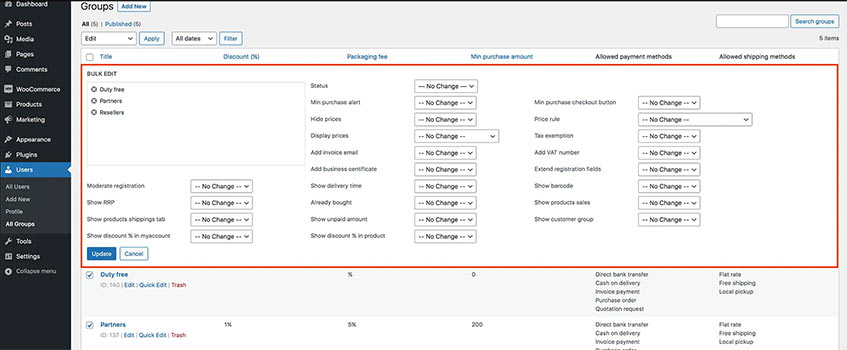
A professional B2B store should allow you to create customer groups and categories with specific permissions, pricing rules, and special discounts. With WooCommerce B2B, we can create customer groups with tailored discount structures—for example, wholesale customers with 40% off or reseller partners with 50% off.
Hidden Pricing and Inventory
This feature allows you to hide prices from specific customer groups or even hide products and entire product categories. For example, you can hide pricing from retail visitors or display selected categories only to top-tier wholesale buyers.
Special Group Rules
Organize customers into groups and apply customized rules to guests and registered users, including automatic default group assignment during registration.
Advanced B2B Registration
Add custom fields to the registration form such as VAT number, tax office, business activity, profession, or any other company information required for account approval.
Separate B2B Registration Forms
If needed, you can create separate login and registration pages for each customer group. This allows prospects to choose the category that best matches their business, while you retain full control to reassign them later through your customer management panel.
Product Category Visibility
Hide entire product categories and their contents from selected customer groups. For example, you can create a customer group that sees only specific categories within your B2B store.
Page Visibility
Restrict access to selected store pages based on customer groups. For example, you can create a page with exclusive B2B partner benefits that is visible only to approved wholesale customers, or display promotions only to selected accounts.
Guest Access Restrictions
You can make your store, cart, and product catalog visible only to registered B2B customers. This means visitors cannot browse products until they register and are approved into a customer group with the proper permissions.
Account Approval
Decide exactly which businesses can buy from your store by manually approving accounts based on their submitted company information. This gives you full control over customer verification before granting group-based pricing and permissions.
Terms and Conditions by Customer Group
Apply different customized terms and conditions to each customer group beyond your standard store-wide terms.
Create Custom Price Lists
Build special pricing structures and discounts for each customer group
Custom B2B Pricing
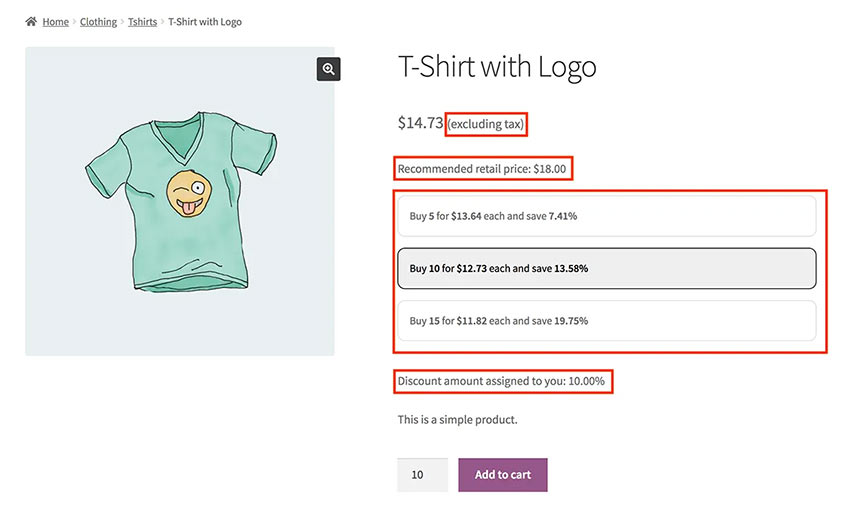
Create advanced pricing catalogs and group-specific discounts, including quantity-based discounts for selected customer groups.
Quote / Request System
Wholesale customers can request products not currently listed in your store using a custom request form. They can also submit requests for pre-orders or backordered products.
Quote / Request Notifications
The store administrator receives an email notification with the customer’s custom request or quote inquiry and can respond directly to begin communication with the wholesale buyer.
Customer Group Discounts
Apply store-wide discounts across your catalog for specific customer groups. Once a customer is assigned to the correct group, they will see all prices automatically adjusted according to their group discount the next time they log in.
Recommended Retail Price (RRP)
In addition to discounted or catalog pricing, you can display a second price field showing the Recommended Retail Price, allowing your B2B customer to view the suggested retail selling price for their own store.
Coupon Rules
Create custom coupon usage rules for the customer groups you have set up.

Advanced B2B Features
Give your wholesale customers powerful tools that simplify ordering
Product Barcodes
Add barcodes to products and display them inside the store so wholesale buyers can use barcode scanners to build orders faster. This is especially useful for businesses placing large-volume orders and helps reduce ordering time significantly.
Business Verification Documents
Add upload fields to registration forms so applicants can submit company registration documents, tax certificates, or other legal paperwork. These documents can then be reviewed in the customer account area before assigning the customer to the appropriate group.
Minimum Order Amount
Set a minimum order value separately for each customer group.
Packaging Fee
Add a packaging fee to orders based on customer group.
Minimum / Maximum Product Quantity
Set minimum or maximum purchase quantities for individual products depending on the customer group.
Saved Shopping Cart
Customers can save the contents of their cart and return later to complete their order. This is ideal for wholesale buyers who build large orders over multiple sessions and want their cart to remain available whenever they log back in.
Invoice Email Address
Add an extra field where customers can specify the email address that should receive invoices—for example, their accounting department email.
European VAT Validation
Add a European VAT field to the checkout form with automatic VAT number validation through the VIES system. The store can verify whether the VAT number is active and automatically remove VAT where applicable, enabling tax-free invoicing.
Tax Exemption
Assign tax-exempt status to selected customer groups, including tax exemption rules based on country.
Prices With or Without VAT
Product prices can be displayed with or without VAT depending on the rules applied to each customer group, including custom price labels if needed.
B2B Shipping & Payment Rules
Configure advanced shipping and payment scenarios for wholesale accounts
Credit Terms / Pay on Account
A B2B store can allow approved customers to place orders on credit and charge purchases to their account. This allows them to complete orders without immediate payment while monitoring their available credit balance through their account dashboard.
Purchase Order Payments
Wholesale customers can place orders using a purchase order or custom quote reference number. Products can be added automatically to the cart using the customer’s approved quoted prices.
Block New Orders
Prevent customers from placing new orders if previous invoices or orders remain unpaid, while displaying the appropriate account message.
Estimated Delivery Time
Enable custom estimated delivery times for selected customer groups.
Shipping Method Permissions
Activate specific shipping methods only for selected customer groups.
Payment Method Permissions
Enable or disable selected payment methods at checkout for specific customer groups. For example, you can disable credit-based ordering for retail customers.
Packaging Quantity Rules
Define packaging quantity requirements for each product so items can only be purchased in specific unit multiples based on customer group.
Security & Performance
How fast and secure can a WooCommerce B2B store really be?
Clean and Fully Integrated Design
User experience is designed for simplicity and speed, fully integrated into WordPress and WooCommerce. Ongoing upgrade support is available through new WooCommerce B2B extension releases.
Compatibility
High compatibility with WordPress themes and plugins.
Performance and Security
Strong security standards, optimized store performance, and reliable scalability for demanding WooCommerce B2B environments.
Multilingual Support
Full multilingual support. All plugin functions have been translated by our team into Greek and English, and the extension also supports translations through the WPML Framework for WordPress.
Value-Added Features
Enhance your store with features that improve the customer experience
Additional Product Tabs
Add custom product information tabs to display shipping cost details, wholesale notes, or the logged-in customer’s previous purchase history.
Email Notifications
Send approval notifications when a customer account is accepted, and notify the store administrator when a new customer registers.
Advanced Admin Filters
Filter users by customer group or account status, and filter orders by payment method for more efficient store management.
B2B Shortcodes
Improve user experience with flexible shortcodes that display useful B2B information such as sales counts, previously purchased products, account data, and more.
Live Search
Live search allows customers to instantly find products by title or SKU and quickly add them to the cart.
Search by SKU
Allow customers to search products and variations by SKU or barcode for a faster and more efficient search experience than the default WordPress search.
Useful Order Details
Display total order weight in the admin panel, along with the customer’s assigned group and current discount level inside their account details.
REST API Support
Use the REST API to manage your B2B data and connect your WooCommerce store with other compatible business applications.
Bulk Actions
Time is money—streamline your daily workflow with faster operations
Quick Orders
Customers can place orders quickly using a simple preformatted CSV file.
Shortcodes
Useful shortcodes let you place B2B data and account-specific content wherever you need it across your store pages.
Bulk Admin Actions
Assign multiple users to customer groups with one click, quickly enable or disable accounts, and manage group data through bulk editing tools.
Import / Export B2B Data
Add or update B2B product data in bulk using WooCommerce import/export tools, and export customer data to Excel files for easier internal processing.